Wednesday, May 18, 2011

Live Free Instant Cricket Score Via SMS*

Hi. friends..

Hope you are all doing well.

Recently, I found a website that provides free score via sms for *Indian mobiles only.
http://www.txtji.com/user/register


Do the steps as below.


  1. First of all, Create a new account and register your mobile.
  2. After that subscribe cricket by click this. http://www.txtji.com/sms_crick. Or select Sms and Cricket Score.

That's it.

Now you receive the score from matches.

Post your comments. If you've any doubts and queries.

>Vsara90<

Sunday, May 8, 2011

Tamil Nadu +2 HSC results via sms

Hello friends...

Hope you are all doing well.

We can get the HSC results thro' sms by registering your mobile no. in the following no.
http://tnpubliclibraries.gov.in/+2-results.html


* Only one registration is allowed per no.


Thursday, April 21, 2011

Technology improved in TamilNadu info by a Tamilan.

Hi folks..

How fast world is going! ( U know 360.9856°/mean solar day). I dont mean that.

I'm saying how fast technology get improved today.

For eg. Nowadays current cut goes nearly 4 hours/day. They are doing the cut at different times or perfect times.


U may think What i'm coming to say?


I've received the EB bill through net. That's it.


I've attached my bill.
The below figure depicts how the calculation takes place for the bill generation.
For confidential I've removed my no. and identification.


--
  With Regards
~V Saravanan~

Mail ids :  vsara90@gmail.com
               saravanan_veeran@yahoo.co.in

My Blogs : vs90.blogspot.com
                 ecesaravanan.blogspot.com
                 saravananveeran.weebly.com

Find your web speed

Hi friends...


A cool tool that checks the speed of the website.

Website Speed Test 


Friday, March 4, 2011

Funniest True

Is your computer “male” or “female”?

1. Open Notepad

2. Type the following line in notepad:

CreateObject("SAPI.SpVoice").Speak"I love You"

3. Save file as computer_gender.vbs

4. Run the file - If you hear a male voice, it's a boy. If you hear a female voice, it's a girl! ;)

http://vs90.blogspot.com/

Funniest True

Is your computer “male” or “female”?

1. Open Notepad

2. Type the following line in notepad:

CreateObject("SAPI.SpVoice").Speak"I love You"

3. Save file as computer_gender.vbs

4. Run the file - If you hear a male voice, it's a boy. If you hear a female voice, it's a girl! ;)

http://vs90.blogspot.com/

Sunday, February 27, 2011

Gmail Advanced Settings

Hi friends.. Every one has a gmail account. So, there should be good privacy and security when we use that. Now Gmail provides advanced options that makes more security to all users. 

Using 2 step verification

It makes our account to be more secure. 


Why you should use 2-step verification

2-step verification adds an extra layer of security to your Google Account by requiring you to have access to your phone – as well as your username and password – when you sign in. This means that if someone steals or guesses your password, the potential hijacker still can't sign in to your account because they don't have your phone.

How you sign in with 2-step verification

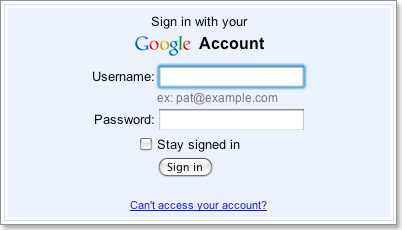
  1. When you want to access Google products from your browser, go to that product and enter your username and password.

    image of brain with arrow to sign in
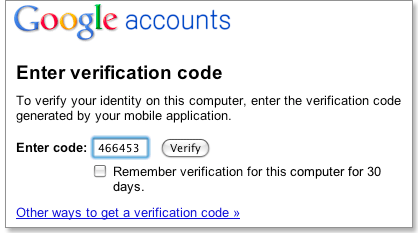
  2. You'll next be prompted to enter your verification code, which you'll get from your phone. You'll only have to do this once every 30 days if you so choose.

    image of phone to verification screen
  3. Soon after you turn on 2-step verification, non-browser applications and devices that use your Google Account (such as Gmail on your phone or Outlook), will stop working. You'll then have to sign in using your username and a special password you generate for this application. (Don't worry, you'll only have to do this once for each device or application.)

    image of application-specific password to phone

What you’ll need

While 2-step verification requires some web savvy, you only need a few basic items:
  1. A phone that is usually available to you when you sign in. This could be:
    • A standard phone (landline or mobile)
    • Any Android device, BlackBerry device, iPhone, iPod Touch, or iPad that can run the Google Authenticator application
  2. A backup phone that you can use if you lose access to your primary phone. This could be:
    • A work or home phone (landline or mobile)
    • The phone of someone you trust, like a friend or family member.

How to get started

Go to your Accounts settings page new window and look for the Using 2-step verification link. If you have the link, click it and start the setup process.
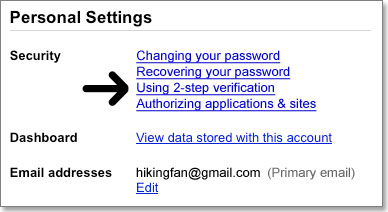
If you do not see the link and you are a Google Apps user, you might have to access the 2-step verification setup through a special URL. new window It is also possible that your domain administrator has not yet set it up for your organization. Check with your domain administrator to find out.

ManageAccount settings page